
Bugsnag
Installation
Follow Bugsnag's installation guide
Error boundries
Detox will report to you about crashes that crashed the entire app. If you use error boundaries in your app, you'd need to send it reports by yourself.
Start by adding a service for Bugsnag's client:
import { Client } from 'bugsnag-react-native';

class BugsnagService {
  constructor() {
    this.client = new Client(`${API_KEY}`);
  }

  notify = (error) => {
    // No need to notify when in development env
    if (__DEV__) {
      return;
    }

    this.client.notify(error);
  }
}

export default new BugsnagService();
Then, inside your ErrorBoundry component, catch the error and notify Bugsnag about it:
import BugsnagService from 'src/services/bugsnag.service';

class ErrorBoundry extends React.Component {
  ...
  static getDerivedStateFromError = (error) => {
    BugsnagService.notify(error);

    return { hasError: true };
  };

  render() { ... }
}
Sourcemap uploading
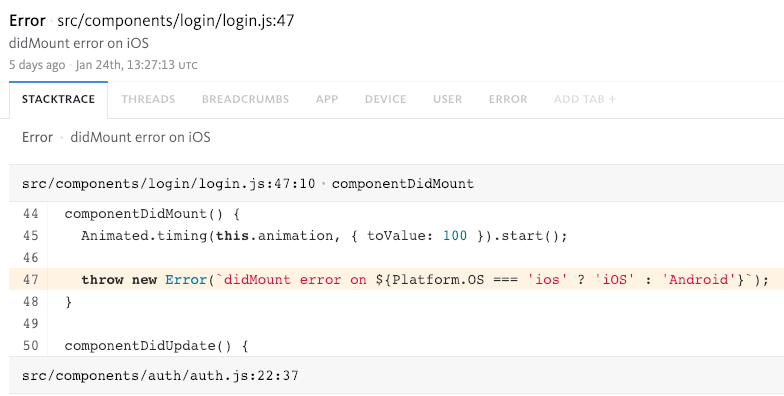
To see your Crash code not minified, you need to upload you bundle and its sourcemap to Bugsnag every time you update your JS code.
Install globally Bugsnag's sourcemap cli npm install bugsnag-sourcemaps -g
Create a file called 'source-map-upload.sh' in your root, and copy-paste this inside:
#!/usr/bin/env bash
if ! [ -x "$(command -v bugsnag-sourcemaps)" ]; then
  npm install bugsnag-sourcemaps -g
fi

# Bundle your js
react-native bundle \
    --platform ios \
    --dev false \
    --entry-file index.js \
    --bundle-output ios-release.bundle \
    --sourcemap-output ios-release.bundle.map &&

react-native bundle \
    --platform android \
    --dev false \
    --entry-file index.js \
    --bundle-output android-release.bundle \
    --sourcemap-output android-release.bundle.map &&

# Upload bundle & source maps to Bugsnag
bugsnag-sourcemaps upload \
    --api-key ${API_KEY} \
    --app-version ${APP_VERSION} \
    --minified-file ios-release.bundle \
    --source-map ios-release.bundle.map \
    --minified-url *main.jsbundle \
    --upload-sources \
    --overwrite true &&

bugsnag-sourcemaps upload \
    --api-key ${API_KEY} \
    --app-version ${APP_VERSION} \
    --minified-file android-release.bundle \
    --source-map android-release.bundle.map \
    --minified-url *index.android.bundle \
    --upload-sources \
    --overwrite true
Remember to replace ${API_KEY} & ${APP_VERSION} (default iOS app version is 0.0.1 and Android's 1.0)
Now we can run this script every time we update our app via Appstore/Playstore or via Codepush.
! If the terminal is screaming at you about permissions, run chmod +x source-map-release.sh ./source-map-release.sh before running the script.