
Running a Project
iOS
Simulator
- Simply run
react-native run-ios, and in will automatically open a simulator with your app
iPhone
- Connect your iPhone to your Mac
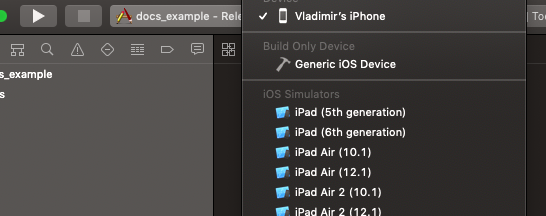
- Open Xcode, and select your connected iPhone in the list, and hit 'Play':
Android
Emulator
- First, open an Android emulator (see Android's setup docs)
- Run
react-native run-android
Android device
- Connect your device via USB, run
adb devicesto make sure it's connected - Run
react-native run-android
! If $ adb command isn't recognized, add this to your .bash_profile (replace YOUR_USER):
alias adb='/Users/${YOUR_USER}/Library/Android/sdk/platform-tools/adb'
! If your app doesn't run on device after running run-android because it 'Can't connect to the development server', run this command in your terminal, and run react-native run-android again:
$ adb reverse tcp:8081 tcp:8081
Aliases
While developing, you'll use react-native run-ios/android A LOT. It's good to create a few aliases to make your life easier. An example of ones we use:
alias rni='react-native run-ios'
alias rna='react-native run-android'
alias rni8='react-native run-ios --simulator="iPhone 8"'
alias rni7='react-native run-ios --simulator="iPhone 7"'
alias rnix='react-native run-ios --simulator="iPhone X"'
alias rnixm='react-native run-ios --simulator="iPhone XS Max"'
alias rnar='react-native run-android --variant="release"'
To open an Android emulator from your terminal, first add these lines to you .bash_profile:
export ANDROID_SDK=$HOME/Library/Android/sdk
export PATH=$ANDROID_SDK/emulator:$ANDROID_SDK/tools:$PATH
Then run emulator -list-avds, to get a list of your installed emulators:
$ emulator -list-avds
New_Device_API_26
Nexus_5X_API_26
Nexus_6P_API_25
Pixel_2_-_9
Pixel_2_XL_API_28
Pixel_API_26
Select the ones you want, and add this you you .bash_profile:
alias anpx2='emulator @Pixel_2_-_9'